- Login to your https://purely.domains/ account
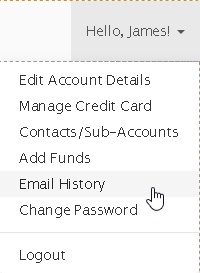
- From the drop down menu in the top right, select "Email History"
- This should take you to https://purely.domains/clientarea.php?action=emails
Thats it! You should now be able to see your Email history.


Thats it! You should now be able to see your Email history.
Using 2FA provides an effective means to secure your accounts from any unauthorised logins....
Log in to your Purely.Domains account. Select the 'Edit Account Details' link from the...
Log in to your Purely.Domains account. Once logged in click the Hello, your name at the top...
1. Log in to your Purely.Domains account. 2. Select the 'Manage Credit Card' link from the...
Terms of Service Domain Agreement Acceptable Use Policy Privacy Policy