

- Log in to your Purely.Domains account.
- Once logged in click the Hello, your name at the top left
- Select Contacts/Sub-Accounts
- Click the drop down next to Choose Contact: and select Add new Contact, enter all the new contact details.
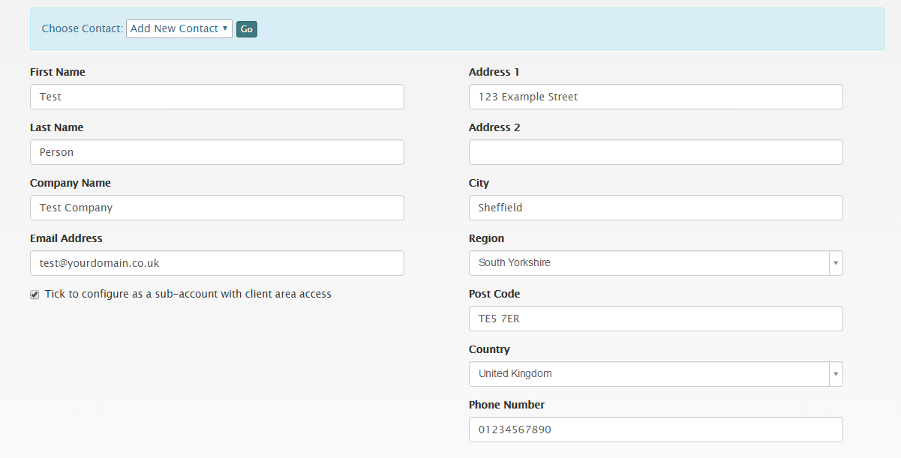
- If you wish this contact to have account access, ensure Tick to configure as a sub-account with client area access is ticked.
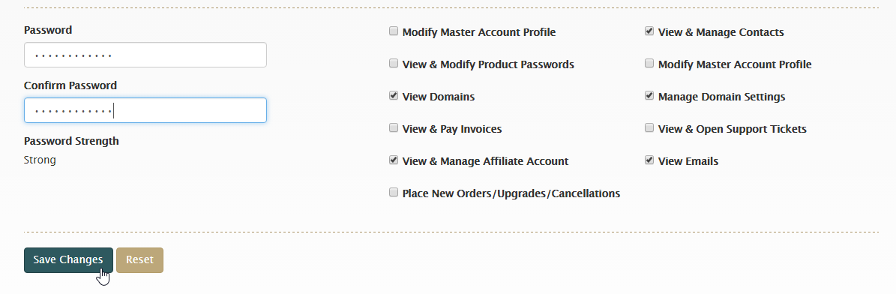
- Enter a secure password and select the permissions that you wish this account to have. Click Save Changes.
Most Popular Articles
Enabling/Disabling 2 Factor Authentication
Using 2FA provides an effective means to secure your accounts from any unauthorised logins....
How do I update the contact details on my account?
Log in to your Purely.Domains account. Select the 'Edit Account Details' link from the...
How to see emails sent to you from Purely.Domains
Login to your https://purely.domains/ account From the drop down menu in the top right, select...
How do I update my payment details?
1. Log in to your Purely.Domains account. 2. Select the 'Manage Credit Card' link from the...
Terms & Conditions
Terms of Service Domain Agreement Acceptable Use Policy Privacy Policy